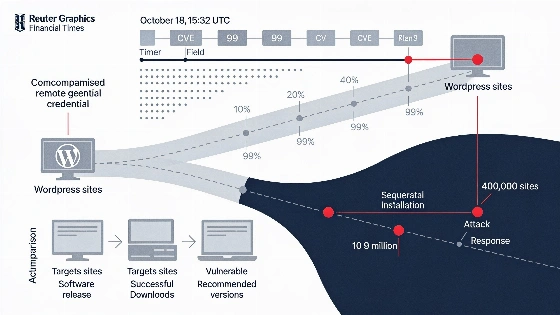
Patchstack says the campaign ran from October 18, 2026, at 15:32 UTC, until October 19 at 09:23 UTC. Attackers used valid remote-management credentials to run code and create accounts with full administrator privileges. The keys connect websites to UpdraftCentral, TeamUpdraft’s remote management service, and do not expire: Patchstack said keys issued in November 2025 were still valid in October 2026. The attackers used signed UpdraftCentral commands, including plugin.upload_plugin, to upload and install plugins on connected sites, Patchstack reported.
The possible reach is sizable: an estimated 10% of sites using UpdraftPlus have an UpdraftCentral or Migrator key, which could put around 400,000 websites in scope.
Active attacks
Patchstack counted 99 malicious backdoor plugins with distinct names, disguised as WordPress maintenance or optimization tools. One example was «Site Health Cache.» Patchstack described an early version as broken because of a coding error; web application security firm Nethemba documented a newer version that can create privileged accounts or log in as existing administrators.
Nethemba said three of its own WordPress sites were targeted through UpdraftCentral, and malicious plugins were successfully installed on two. The firm said all three sites ran WordPress 7.1.3 and UpdraftPlus 2.26.11, patched against the June vulnerability CVE-2026-10795. Nethemba detected the attack on October 19 after WordPress generated an error notice for a plugin its staff had not installed. Its analysis linked an UpdraftCentral plugin-upload command to IP address 43.250.53.42; one sample was named «Load Stack 35C».
«The attacker did not break into our servers and did not exploit any weakness in our configuration. The attacker came in through the UpdraftCentral remote management channel and signed the commands with valid private dashboard keys,» Nethemba said in its incident analysis.
What was accessed
TeamUpdraft detected unauthorized access to its infrastructure over the weekend of 17-18 October and believes the attacker accessed its customer database. In an advisory, the company said: «Over the weekend of 17-18 October we identified unauthorised access to the teamupdraft.com website. Our team responded straight away and worked through the night to contain it: we closed the access route, signed out every account and replaced the keys and credentials that could have been affected.»
The database included customer and billing details, order history, password hashes, two-factor authentication settings, and connection keys for UpdraftCentral, UpdraftVault, and UpdraftClone. TeamUpdraft says it did not store payment details. UpdraftPlus plugin files and downloads were unaffected, as were self-hosted UpdraftCentral instances. The company said it closed the access route, strengthened its website security, signed out all accounts and replaced potentially affected keys and credentials, as detailed in its security incident advisory.
TeamUpdraft makes several WordPress tools. UpdraftPlus handles backups and restoration and has more than 4 million downloads; UpdraftCentral manages multiple sites remotely. UpdraftVault provides cloud backup storage, while UpdraftClone creates staging websites.
Recommended steps
Nethemba reported that TeamUpdraft’s initial 1.26.12/2.26.12 release was intended to remove UpdraftCentral Cloud keys, but a bug prevented their removal. TeamUpdraft later released UpdraftPlus 1.26.13 for the free version and 2.26.13 for Premium, just after 22:00 BST on October 19. The update automatically disables UpdraftCentral connections created before 22:00 BST on October 18. Users should update to those versions or later, then log in to each WordPress site and delete the connection keys at Settings → UpdraftPlus Backups → Advanced Tools → UpdraftCentral → Manage existing keys.
TeamUpdraft recommends rotating remote-storage credentials and reauthorizing connections for users who accessed sites through UpdraftCentral. Administrators should also check logs and files for indicators of compromise published by TeamUpdraft, Patchstack, and Nethemba. Nethemba said it shared three malware samples from one affected website with Wordfence and Patchstack on October 20, including a minimal variant hidden from the installed-plugins list. For a confirmed compromise, the recommended response is to restore from clean backups, change the TeamUpdraft account password, revoke all sessions, and reset the two-factor authentication method.