A Cloudflare challenge can stop people before the ChatGPT login page loads. When the check fails, a message may say “Please unblock challenges.cloudflare.com to proceed” or keep asking users to verify they are human. That points to a connection or browser problem; it does not mean an OpenAI account has been banned. OpenAI’s troubleshooting guidance treats a repeated “Checking your browser…” verification as an access problem and recommends checking browser and network settings.
The quickest way to find the cause is to compare networks. If ChatGPT works on a phone hotspot but fails on office WiFi, the company network is the likely barrier. If the error follows the laptop to mobile data, check the browser or VPN. OpenAI recommends trying a private window or clean browser profile, then switching networks, for example, from corporate WiFi to mobile data. That can help distinguish browser issues from network restrictions.
How the check works
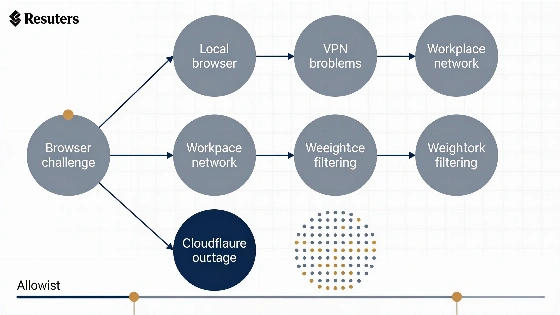
ChatGPT sits behind Cloudflare, which checks browser requests before they reach OpenAI. The check may run invisibly or show a “Verify you are human” prompt. The error names challenges.cloudflare.com, the Cloudflare address that serves the check. The page can fail to load because of a local setting, network filtering or a Cloudflare outage.
OpenAI says it uses these checks on web, iOS and Android to limit bot activity and spam. In a Fello AI header check dated October 25, 2026, requests to chatgpt.com, openai.com and auth.openai.com returned “server: cloudflare” and a Cloudflare Ray ID. The script received a challenge instead of the page.
Check status.openai.com and cloudflarestatus.com before changing settings. Cloudflare’s November 18, 2025 outage shows why. A faulty Bot Management configuration file began spreading across its servers at 11:20 UTC, and service returned to normal at 17:06 UTC, information from Cloudflare’s post-mortem. The company said it was not a cyber attack and that Turnstile failed to load. TechRadar reported that a ChatGPT login attempt showed “Please unblock challenges.cloudflare.com to proceed.” OpenAI attributed the issue to “one of our third-party service providers.”
Fix the loop
OpenAI recommends checking the browser and network before contacting support. Its login troubleshooting guidance advises testing a private window or clean browser profile, trying another network and temporarily disabling VPNs, proxies, ad blockers, privacy tools and script blockers. OpenAI also says cookies, including third-party cookies, and JavaScript should be enabled for chatgpt.com, openai.com and auth.openai.com.
- Reload in a private window to test without extensions or cached data.
- Pause a VPN or proxy, including a VPN browser extension.
- Disable ad blockers and privacy or script-blocking tools for the test.
- Allow JavaScript and cookies, including third-party cookies, for chatgpt.com, openai.com and auth.openai.com.
- Update the browser or try another supported browser. Internet Explorer is unsupported; older browsers, embedded browsers and in-app browsers may also fail. Cloudflare’s debug.challenges.cloudflare.com test page checks whether a browser can complete a challenge.
- Switch to another WiFi network or a phone hotspot.
- If the problem is limited to work or school WiFi, ask IT to review the network filter.
- If a CAPTCHA appears on every message after the VPN and extensions are off, send OpenAI support a screenshot of the puzzle. OpenAI says the image includes a request ID that support can trace.
Cloudflare says a challenge solved from an IP address different from the one that received it is invalid. A VPN that rotates exit servers can restart the check; a proxy or an office network routing traffic through several addresses can do the same. Other documented causes include an unstable connection, blocked challenge scripts, unsupported browsers, disabled JavaScript and bot detection that mistakes a real visitor for a bot. Cookie managers and cookie-consent overlays can also interfere with login buttons or verification flows. An occasional CAPTCHA can be normal, but OpenAI says users should report one that appears on every message.
Changing DNS is not among OpenAI’s listed web fixes for this error. Cloudflare also does not support automated browsers solving its checks, so “Cloudflare bypass” tools are not a reliable workaround.
When work blocks ChatGPT
If colleagues also fail on office WiFi while mobile data works, ask IT to check web filtering against OpenAI’s network recommendations. OpenAI says companies should allow its domains and ensure filters do not replace its responses with unexpected content. Its recommendations name products including McAfee Web Gateway, Cisco Umbrella, Symantec Cloud Secure Web Gateway, Palo Alto Networks PAN-DB, Zscaler Internet Access, Sophos Firewall, Barracuda Web Security Gateway and Fortinet FortiGuard URL filtering. OpenAI also says managed networks may need to allowlist Cloudflare challenge traffic.
OpenAI’s allowlist has 31 entries. Ask IT to start with challenges.cloudflare.com, *.chatgpt.com, *.openai.com, *.auth.openai.com, *.oaistatic.com and *.oaiusercontent.com, then check the full list in OpenAI’s “Network recommendations for ChatGPT errors on web and apps” help article. OpenAI also specifies WebSocket access to wss://ws.chatgpt.com over TCP port 443. Filters should not intercept cookies or rewrite responses. TLS inspection or proxy settings can also interrupt long-running WebSocket connections.
The Mac app can show “Network configuration issue” when SSL inspection presents the wrong certificate. OpenAI recommends turning off SSL inspection for public OpenAI domains and using ChatGPT on the web as a workaround. For some ChatGPT Enterprise or Edu organizations using Cloudflare Zero Trust with TLS decryption, OpenAI says a Cloudflare certificate change can disrupt the Mac and iOS apps; administrators need to add a firewall policy. OpenAI maintains a troubleshooting collection covering access issues for ChatGPT Mac and iOS apps with Cloudflare Zero Trust. The web client, Windows and Android keep working in that case.
Read the error
“Sorry, you have been blocked” indicates a Cloudflare IP block, which OpenAI describes as temporary and separate from an account ban. OpenAI lists VPN use among the possible causes and advises disabling a VPN, trying another location or waiting for a temporary restriction to expire in its blocked-access guidance. “Error 1020: Access denied” is an HTTP 403 caused by a site-owner security rule; send OpenAI support a screenshot with its Ray ID. A Cloudflare 5xx error points to a network failure on Cloudflare’s side, so check both status pages.